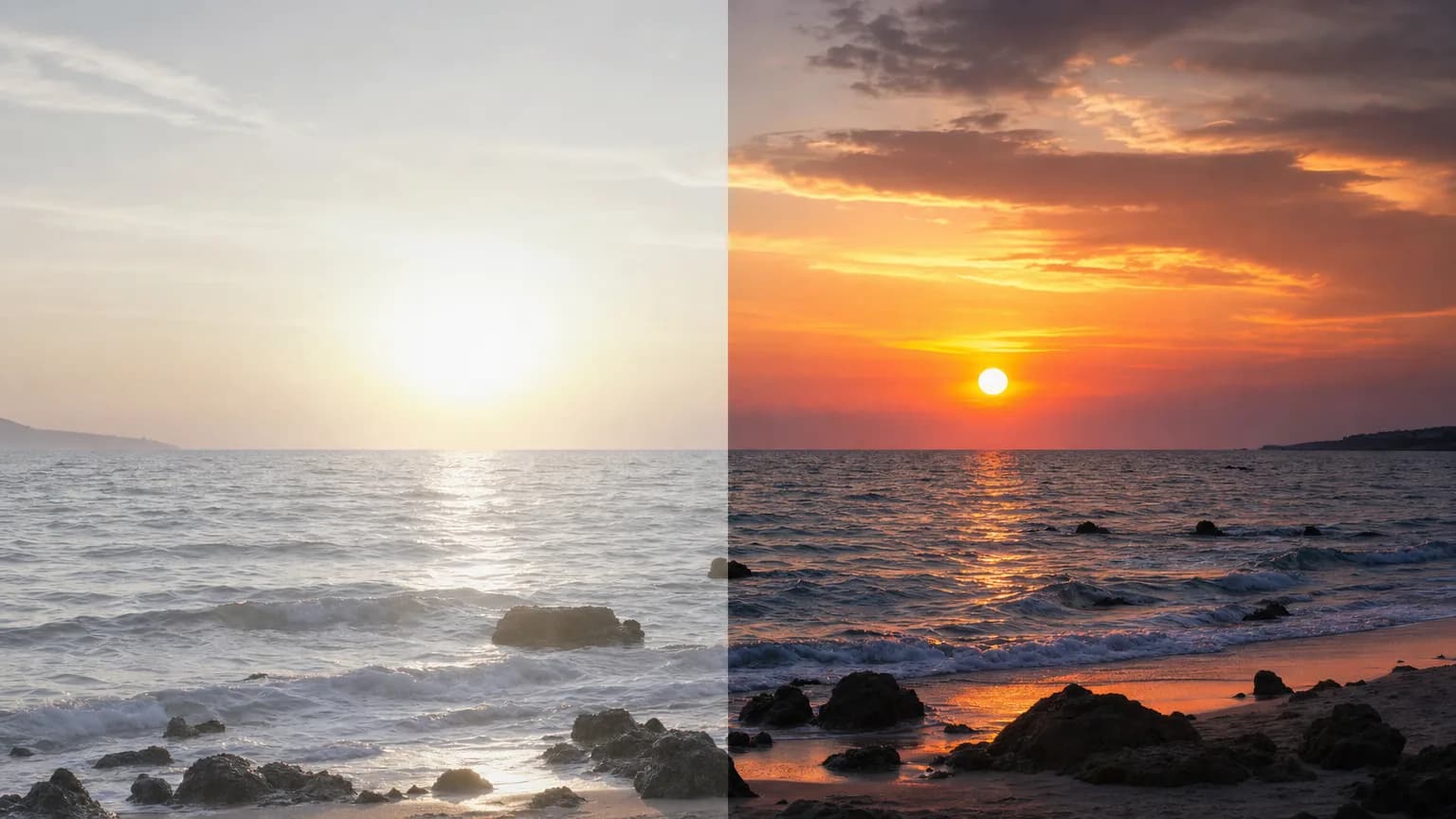
Most video ever shot is SDR, standard dynamic range. Most screens sold in the last five years are HDR. That gap is the whole reason this site exists, and it is worth understanding what sits on either side of it before you convert anything.
What SDR actually is
SDR is not a format. It is a set of assumptions baked into a file:
- Peak brightness around 100 nits. The grading standard SDR was built for (BT.1886, on a reference CRT-era monitor) assumes white is about 100 nits. Your phone can hit 1,000–2,000.
- 8-bit color. 256 steps per channel, 16.7 million colors total. Enough for most images, not enough for a smooth sky.
- Rec. 709 primaries. A relatively small slice of what the human eye sees, and of what a modern panel can show.
When an SDR file plays on an HDR display, the player stretches it to fit. That stretch is a guess. Nothing in the file tells the TV how bright the sun in your shot was supposed to be, so the TV picks something safe and flat.
The reason skies band and brick walls don't is arithmetic, not a flaw in the footage. 8-bit gives you 256 total steps across the whole range from black to white, and a subtle gradient (a sky moving from pale horizon blue to deep zenith blue) usually spans only a narrow slice of that full range to begin with, so it only gets whatever fraction of the 256 steps falls inside that slice, sometimes not many. A brick wall's texture spans a much wider slice, so it inherits far more of those steps and shows no banding at all. More bit depth does not add brightness. It adds steps everywhere, including inside that narrow slice, which is exactly why 10-bit fixes gradients without touching exposure.
The numbers behind "ten times the headroom"
The gap between SDR and HDR gets described as roughly ten times more headroom often enough that it is worth showing where that number actually comes from. It is not a rounded-up marketing figure. It falls directly out of the reference points both systems are built on.
SDR's reference white is 100 nits. That number comes from BT.1886, a standard written around a CRT-era reference monitor, and it has stuck around because every SDR file ever graded assumes a colorist was working against it, whether or not the monitor in the room could actually go brighter.
HDR10 does not have a single reference white. It has a mastering target: the peak brightness the colorist graded against, written into the file as static metadata. In practice there are really only three numbers in circulation. 1,000 nits is the most common target for on-demand HDR10 delivery. 4,000 nits shows up in cinema-grade masters and premium Dolby Vision releases (whose base layer still carries HDR10 metadata). 10,000 nits is the theoretical ceiling the PQ curve was built to support, and essentially nothing is graded anywhere near it, because no consumer display gets close.
Take the most common case, 1,000 nits against SDR's 100, and you get the ten times figure directly. It is not approximate the way "about ten times faster" usually is. It is the literal ratio between the two reference points the whole pipeline is built on.
The PQ curve (SMPTE ST 2084) is also not linear the way SDR's gamma curve is, and that shapes where the extra bit depth actually goes. PQ spends roughly half of its 10-bit code space, values 0 through about 520 out of 1,023, on the first 100 nits alone. The remaining 9,900 nits, everything from 100 nits up to the 10,000-nit ceiling, share the other half. A 1,000-nit highlight lands around code value 770. A 4,000-nit cinema target lands around 920. This is not waste, it is deliberate: the eye is far more sensitive to small brightness differences in shadow and midtone than in a highlight that is already blazing, so PQ spends its precision where a viewer can tell the difference and rations it where they cannot.
That is also why the display matters as much as the file. A TV rated for 1,000 nits peak brightness and a phone rated for 1,600 will both receive the identical PQ-encoded value for, say, a 4,000-nit highlight, and both will compress it down to whatever they can actually produce. The file's ceiling and the display's ceiling are two separate numbers on every HDR pipeline, converted footage included.
What HDR10 adds
HDR10 is the baseline HDR format, the one every HDR TV, iPhone 12 and later, iPad Pro, and YouTube handle without negotiation. It is also where the absolute-luminance idea behind the PQ curve above actually gets used. Inside the file, three things change:
- 10-bit color. 1,024 steps per channel instead of 256. This is the single biggest visible difference, and it shows up in gradients: skies, skin, out-of-focus backgrounds, fades to black. Where 8-bit banding used to march across the frame in visible steps, 10-bit is smooth.
- PQ transfer function. Instead of encoding "how bright relative to white," HDR10 encodes absolute luminance up to 10,000 nits. A specular highlight can be tagged as actually bright rather than as bright as white.
- Rec. 2020 container. A wider color volume, so saturated reds and deep cyans stop clipping to the edge of the gamut.
The practical result is headroom. In SDR, a chrome reflection, a sunset, and a white shirt all collapse toward the same value near the top of the range. In HDR they separate, because each one now carries its own place on the PQ curve instead of sharing a single ceiling.
What conversion can and cannot do
This is the honest part.
It can re-derive luminance and color for the HDR container: expand the tonal range, map highlights into the headroom PQ provides, and rebuild gradients at 10-bit so they stop banding. Our engine does this per frame, which is why a conversion is priced by the second.
It cannot invent detail that the 8-bit file never recorded. If a highlight was fully clipped at capture (a blown-out window with every channel pinned at 255) there is no texture hiding underneath. Conversion will render that region cleanly and brightly, but it will not reconstruct the curtain behind the glare.
A sunset, frame by frame. Say the source clip is a beach shot: sky, sun low on the horizon, wet sand throwing back a highlight. In the 8-bit SDR file, the sun's disc, the brightest ring of sky around it, and the specular flash off the wet sand are all sitting within a handful of code values of 255, the ceiling of an 8-bit channel. To the file, they are nearly the same brightness, because SDR has nowhere else to put them: everything at or near maximum white flattens into a narrow band at the very top of the range.
Conversion does not have new pixels to work with, it has the same 8-bit values everyone else does. What it does is read the local contrast and roll-off around that cluster, how fast the sky darkens moving away from the sun, how the highlight on the sand falls off at its edges, and use that shape to decide how far into the new 10,000-nit-capable range each part should go. The sun's disc, fully clipped, gets pushed toward the top of the available range, because nothing in the frame suggests texture is hiding there. The ring of sky around it, which still carried a faint gradient even in the crushed 8-bit source, gets separated out and placed measurably lower, because that gradient is exactly the information a 10-bit file has room to preserve. The specular flash on the sand gets its own placement based on its own falloff. Three regions that were nearly indistinguishable in the source come out separated and readable in the output, not because detail was invented, but because the file finally has enough numeric room to keep apart what was already there.
So the footage that benefits most is footage with room left in it: properly exposed, not crushed, not already pushed hard in a grade. Log or flat-graded material converts especially well. Heavily stylized, high-contrast SDR converts least well, because the stylization already threw away the range HDR wants to use.
What you get back
A 10-bit H.265 MP4 with HDR10 metadata. Resolution and frame rate come back exactly as they went in: a 1080p30 clip returns 1080p30, a 4K60 clip returns 4K60. There is no watermark, and no re-encode of your audio track's timing.
Pricing follows the work: $6.00 per 10 seconds at 1080p and below, $12.75 per 10 seconds above 1080p, with a $0.60 minimum per conversion. A 20-second 1080p clip runs $12.00; the same 20 seconds shot above 1080p runs $25.50, because there is more data per frame to remap. Uploads and outputs are deleted after 7 days, and a failed conversion refunds automatically, without you having to request it.
Questions people ask
Will converted footage look better on an SDR screen?
No, and it should not. An SDR display tone-maps the HDR10 file back down, landing close to where the original was. The gain exists on a display with the headroom to show it, which is most televisions and phones sold in the last few years.
Does converting change file size?
Usually upward. A 10-bit HEVC file carries more data per frame than an 8-bit source, which is the point: the extra levels are what stop the remapped highlights banding. A converted file that came out smaller than its source has probably lost the detail the conversion added.
Is HDR the same thing as a brighter picture?
No. HDR keeps diffuse white roughly where it was and adds range above it. That is why converted footage does not look uniformly brighter: the parts that were already correct stay put, and only the highlights that were flattened get somewhere to go.
Where to start
Before you convert anything, it helps to separate two things that get conflated constantly: a display cranking its backlight, and a file actually carrying more range.
Almost every TV sold today has a "vivid" or "dynamic contrast" picture mode that pushes an SDR signal brighter and boosts saturation to compensate for showroom lighting. It looks more striking next to a TV set to a calibrated mode, and it is easy to mistake for HDR because the two effects share a word. But the TV is still working from an 8-bit SDR signal with a single reference white. It has no per-pixel instruction for how bright the sun in your shot is supposed to be relative to everything else, so all it can do is scale the whole image up or down uniformly. That preserves nothing extra, it just relocates the same limited information to a brighter part of the display's range.
A true HDR10 file is different because the information itself changed: the sun, the sky around it, and a white shirt in the same frame carry three different absolute luminance values instead of one shared ceiling, and a display that reads PQ metadata reproduces each of them at its own brightness instead of stretching all three together. That is the difference conversion is actually selling, not a brighter picture, a picture with more distinct values in a range that used to be flat.
Pick a 10-second clip with a bright practical light or a sky in it, convert it, and watch it on an actual HDR screen, not a laptop preview in a browser that may tone-map it back down before it ever reaches your eyes. If you need to go the other way deliberately, converting HDR to SDR covers doing it without the washed-out result. If a TV's vivid mode still looks similar to the converted file, you are likely watching the SDR original with backlight compensation, not HDR10 metadata actually being read.
If you want the mechanics of doing that, read how to convert an SDR video to HDR. If you want to know which screens and platforms will honor the result, read where HDR video actually plays.